> ## Documentation Index
> Fetch the complete documentation index at: https://mintlify.com/dgtlmoon/changedetection.io/llms.txt
> Use this file to discover all available pages before exploring further.

# Changedetection.io

> Detect website changes automatically and get instant alerts

<div className="relative overflow-hidden bg-gradient-to-br from-[#393e72] via-[#040404] to-[#1a1d27] dark:from-[#393e72] dark:via-[#040404] dark:to-[#0f1117] py-20 lg:py-24">
  <div className="max-w-7xl mx-auto px-6 lg:px-8">
    <div className="grid grid-cols-1 lg:grid-cols-12 gap-12 items-center">
      <div className="lg:col-span-7">
        <h1 className="text-4xl sm:text-5xl lg:text-6xl font-bold text-white mb-6">
          Monitor website changes in real-time
        </h1>

        <p className="text-lg sm:text-xl text-gray-300 dark:text-gray-300 max-w-2xl mb-8">
          Detect content updates, price changes, and restock alerts automatically. Get instant notifications via Discord, Slack, Email, and more—all from a self-hosted or cloud platform.
        </p>

        <div className="flex flex-col sm:flex-row gap-4 flex-wrap">
          <a href="/quickstart" className="inline-flex items-center justify-center px-6 py-3 text-base font-semibold text-white bg-[#92a4d0] hover:bg-[#7b8ec0] rounded-lg transition-colors no-underline">
            Get started
          </a>

          <a href="/api/introduction" className="inline-flex items-center justify-center px-6 py-3 text-base font-semibold text-white border border-white/30 bg-white/10 hover:bg-white/20 rounded-lg transition-colors no-underline">
            Explore API
          </a>
        </div>
      </div>

      <div className="lg:col-span-5 hidden lg:block">
        <div className="rounded-2xl overflow-hidden border border-white/20 shadow-2xl">
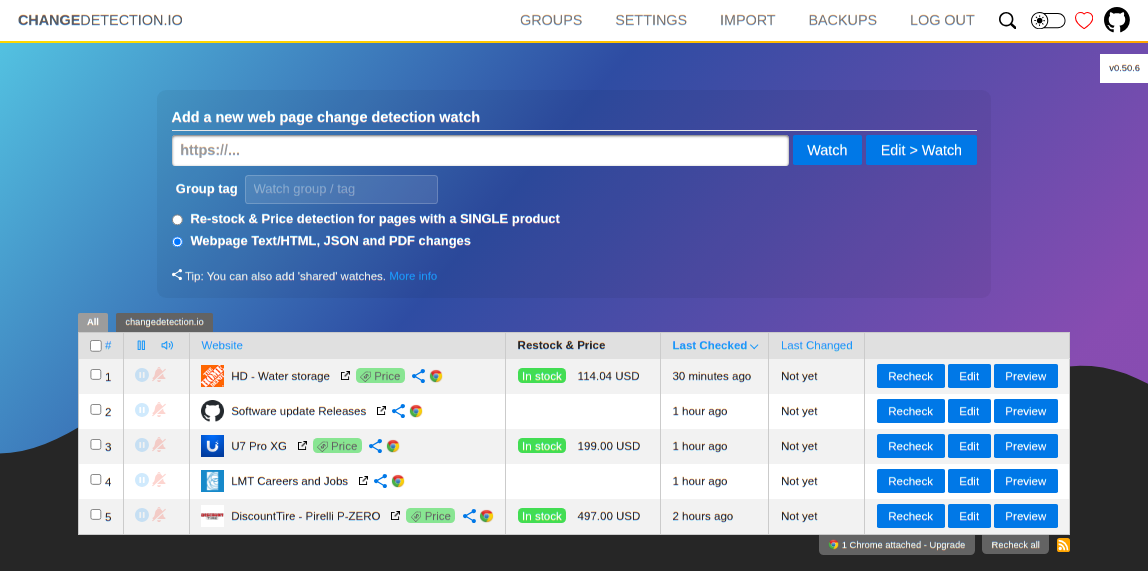
          <img src="https://raw.githubusercontent.com/dgtlmoon/changedetection.io/master/docs/screenshot.png" alt="Changedetection.io dashboard showing monitored websites" noZoom className="w-full h-auto" />
        </div>
      </div>
    </div>
  </div>
</div>

<div className="mt-16 mb-16 max-w-5xl mx-auto px-6">
  <div className="text-center mb-12">
    <h2 className="text-2xl sm:text-3xl font-bold text-gray-900 dark:text-white mb-4">
      Quick start
    </h2>

    <p className="text-base text-gray-600 dark:text-gray-400 max-w-2xl mx-auto">
      Get up and running with changedetection.io in minutes
    </p>
  </div>

  <Steps>
    <Step title="Install changedetection.io">
      Choose your preferred installation method. Docker is recommended for quick setup:

      ```bash Docker theme={null}
      docker run -d --restart always -p "127.0.0.1:5000:5000" -v datastore-volume:/datastore --name changedetection.io dgtlmoon/changedetection.io
      ```

      Or install via pip:

      ```bash pip theme={null}
      pip3 install changedetection.io
      changedetection.io -d /path/to/data/dir -p 5000
      ```
    </Step>

    <Step title="Access the dashboard">
      Open your browser and navigate to `http://127.0.0.1:5000`. You'll see the changedetection.io dashboard where you can add and manage your website monitors.
    </Step>

    <Step title="Add your first watch">
      Click **Add new** to create your first website monitor. Enter the URL you want to track, configure notification settings, and start monitoring for changes.

      <Tip>Use the Visual Selector tool to target specific elements on the page for more precise change detection.</Tip>
    </Step>

    <Step title="Set up notifications">
      Configure notification endpoints in **Settings**. Changedetection.io supports Discord, Slack, Email, Telegram, webhooks, and many more notification services via Apprise.

      ```
      discord://webhook_id/webhook_token
      mailto://user:pass@example.com?to=receivingAddress@example.com
      json://someserver.com/custom-api
      ```
    </Step>
  </Steps>
</div>

<div className="mt-16 mb-16 max-w-5xl mx-auto px-6">
  <div className="text-center mb-12">
    <h2 className="text-2xl sm:text-3xl font-bold text-gray-900 dark:text-white mb-4">
      Explore by topic
    </h2>

    <p className="text-base text-gray-600 dark:text-gray-400">
      Discover everything changedetection.io can do for you
    </p>
  </div>

  <CardGroup cols={2}>
    <Card title="Visual selector" icon="cursor-pointer" href="/features/visual-selector">
      Target specific elements on web pages with the interactive visual selector tool
    </Card>

    <Card title="Browser automation" icon="robot" href="/features/browser-steps">
      Fill forms, click buttons, and interact with pages before detecting changes
    </Card>

    <Card title="Price & restock monitoring" icon="tag" href="/features/restock-price-monitoring">
      Track product prices and get alerts when items come back in stock
    </Card>

    <Card title="Content filtering" icon="filter" href="/extraction/css-selectors">
      Extract specific content with XPath, CSS selectors, JSONPath, and jq
    </Card>

    <Card title="Scheduling" icon="clock" href="/features/scheduling">
      Set custom check schedules based on timezone, day of week, and time ranges
    </Card>

    <Card title="Conditional monitoring" icon="code-branch" href="/features/conditional-monitoring">
      Trigger alerts only when specific conditions are met
    </Card>
  </CardGroup>
</div>

<div className="mt-16 mb-16 max-w-5xl mx-auto px-6">
  <div className="text-center mb-12">
    <h2 className="text-2xl sm:text-3xl font-bold text-gray-900 dark:text-white mb-4">
      Powerful features
    </h2>

    <p className="text-base text-gray-600 dark:text-gray-400">
      Everything you need for comprehensive website monitoring
    </p>
  </div>

  <div className="grid grid-cols-1 md:grid-cols-2 gap-6">
    <a href="/browser/playwright" className="group block rounded-2xl border border-gray-200 dark:border-[#27272a] hover:border-[#92a4d0] dark:hover:border-[#92a4d0] bg-white dark:bg-[#1a1d27] overflow-hidden transition-colors no-underline">
      <div className="h-48 overflow-hidden flex items-center justify-center bg-gray-50 dark:bg-[#0f1117]">
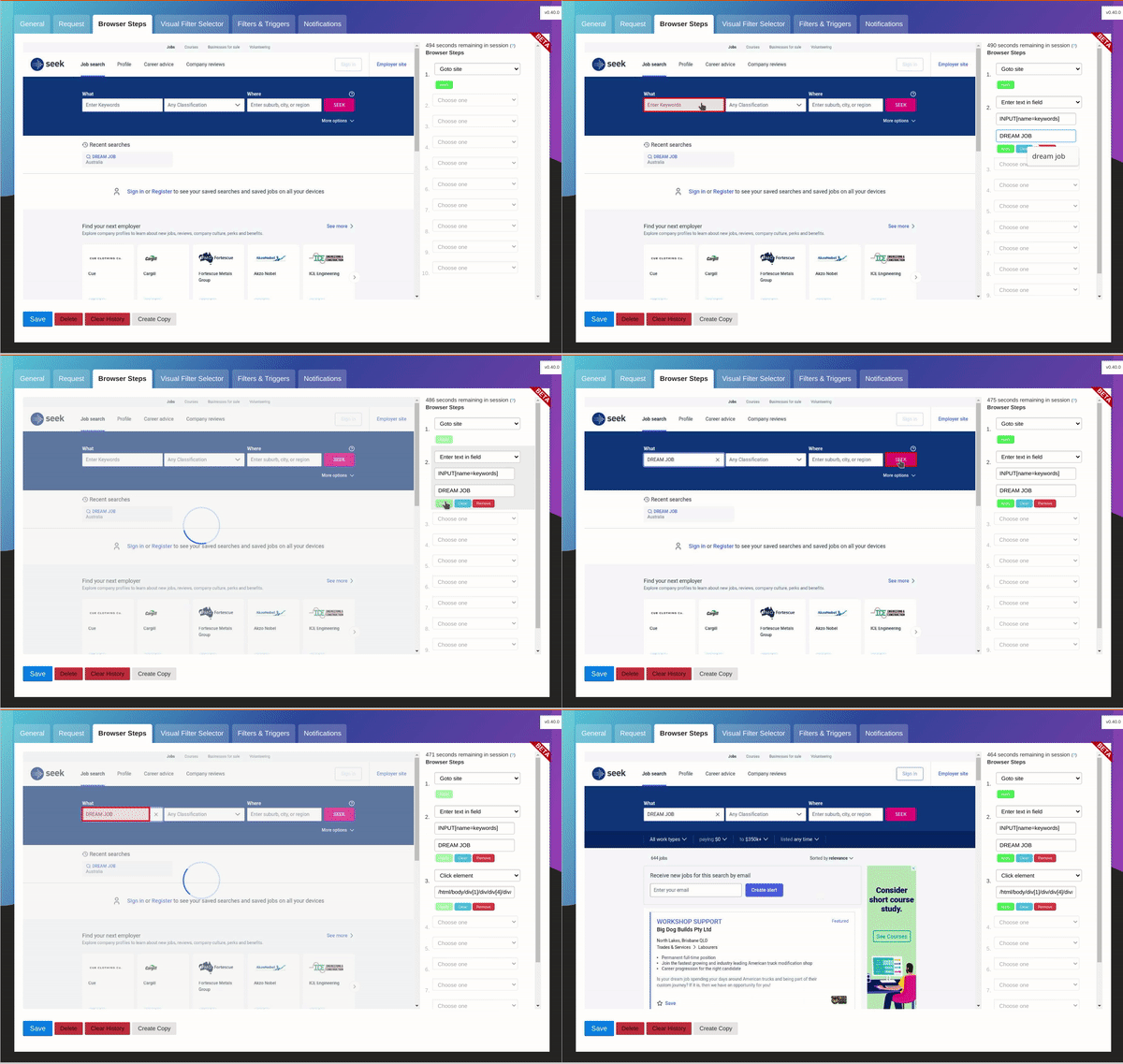
        <img src="https://raw.githubusercontent.com/dgtlmoon/changedetection.io/master/docs/browsersteps-anim.gif" alt="Browser automation steps in action" noZoom className="w-full h-full object-cover" />
      </div>

      <div className="p-6">
        <h3 className="text-base font-semibold text-gray-900 dark:text-white mb-2">
          Interactive browser steps
        </h3>

        <p className="text-sm text-gray-600 dark:text-gray-400 mb-3">
          Automate interactions like logging in, filling forms, and clicking buttons before monitoring changes
        </p>

        <div className="flex items-center text-sm font-medium text-gray-600 dark:text-gray-400 group-hover:text-[#92a4d0] transition-colors">
          Learn more

          <svg className="ml-1 w-4 h-4" fill="none" viewBox="0 0 24 24" stroke="currentColor">
            <path strokeLinecap="round" strokeLinejoin="round" strokeWidth={2} d="M9 5l7 7-7 7" />
          </svg>
        </div>
      </div>
    </a>

    <a href="/features/restock-price-monitoring" className="group block rounded-2xl border border-gray-200 dark:border-[#27272a] hover:border-[#92a4d0] dark:hover:border-[#92a4d0] bg-white dark:bg-[#1a1d27] overflow-hidden transition-colors no-underline">
      <div className="h-48 overflow-hidden flex items-center justify-center bg-gray-50 dark:bg-[#0f1117]">
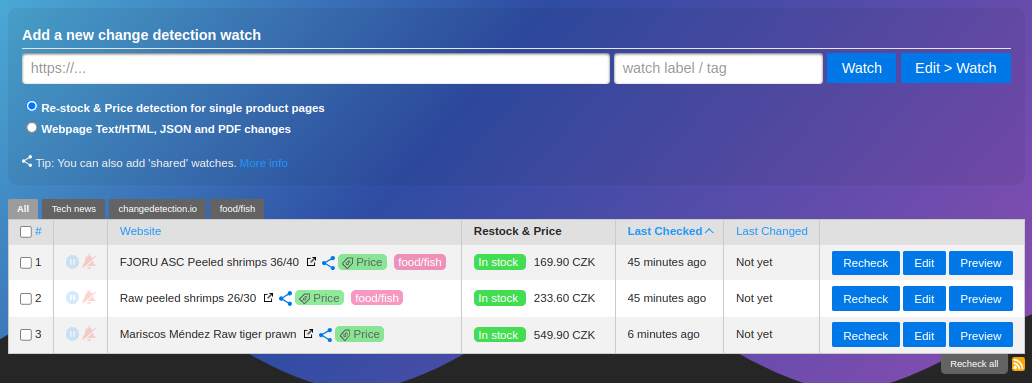
        <img src="https://raw.githubusercontent.com/dgtlmoon/changedetection.io/master/docs/restock-overview.png" alt="Product price tracking dashboard" noZoom className="w-full h-full object-cover" />
      </div>

      <div className="p-6">
        <h3 className="text-base font-semibold text-gray-900 dark:text-white mb-2">
          Price & restock alerts
        </h3>

        <p className="text-sm text-gray-600 dark:text-gray-400 mb-3">
          Monitor product pricing and availability with intelligent metadata extraction
        </p>

        <div className="flex items-center text-sm font-medium text-gray-600 dark:text-gray-400 group-hover:text-[#92a4d0] transition-colors">
          Learn more

          <svg className="ml-1 w-4 h-4" fill="none" viewBox="0 0 24 24" stroke="currentColor">
            <path strokeLinecap="round" strokeLinejoin="round" strokeWidth={2} d="M9 5l7 7-7 7" />
          </svg>
        </div>
      </div>
    </a>
  </div>
</div>

<div className="mt-16 mb-16 max-w-5xl mx-auto px-6">
  <div className="text-center mb-12">
    <h2 className="text-2xl sm:text-3xl font-bold text-gray-900 dark:text-white mb-4">
      Resources
    </h2>
  </div>

  <CardGroup cols={3}>
    <Card title="Installation guides" icon="download" href="/installation/docker">
      Docker, pip, Windows, and Docker Compose installation instructions
    </Card>

    <Card title="API reference" icon="code" href="/api/introduction">
      Complete REST API documentation for programmatic access
    </Card>

    <Card title="Chrome extension" icon="chrome" href="/browser/chrome-extension">
      Add websites to your monitors directly from your browser
    </Card>
  </CardGroup>
</div>

<div className="mt-20 mb-16 max-w-4xl mx-auto px-6">
  <div className="rounded-2xl border border-gray-200 dark:border-[#27272a] bg-gradient-to-br from-white to-gray-50 dark:from-[#1a1d27] dark:to-[#0f1117] p-8 sm:p-12 text-center">
    <h2 className="text-2xl sm:text-3xl font-bold text-gray-900 dark:text-white mb-4">
      Ready to start monitoring?
    </h2>

    <p className="text-base text-gray-600 dark:text-gray-400 max-w-2xl mx-auto mb-8">
      Deploy changedetection.io in minutes and never miss an important website update again
    </p>

    <a href="/quickstart" className="inline-flex items-center justify-center px-8 py-3 text-base font-semibold text-white bg-[#040404] hover:bg-[#1a1a1a] dark:bg-[#92a4d0] dark:hover:bg-[#7b8ec0] rounded-lg transition-colors no-underline">
      Get started now
    </a>
  </div>
</div>


This documentation is built and hosted on [Mintlify](https://mintlify.com), a developer documentation platform.